API Common Parameters & Merchant Key Configuration
# Unified Request Method
- HTTP POST
# ContentType
- Application/Json
# Bind Google Authenticator Code
- Log in to the merchant backend -> Personal Center -> Security Information. Use Google Authenticator to scan the QR code on the page to bind your account.
# RSA Key Pair Generation
import java.security.KeyPair;
import java.security.KeyPairGenerator;
import java.security.NoSuchAlgorithmException;

public class KeyGenerator {

    public static final String RSA = "RSA";
    public static final int KEY_SIZE = 2048;

    // Generate a 2048-bit key pair
    public static KeyPair generateKeyPair() throws NoSuchAlgorithmException {
        KeyPairGenerator keyGen = KeyPairGenerator.getInstance(RSA);
        keyGen.initialize(KEY_SIZE);
        return keyGen.generateKeyPair();
    }
    public static void main(String[] args) throws Exception {
        // 1. Generate a key pair
        KeyPair keyPair = generateKeyPair();

        // 2. Get the public and private keys
        byte[] publicKeyBytes = keyPair.getPublic().getEncoded();
        byte[] privateKeyBytes = keyPair.getPrivate().getEncoded();

        // 3. Convert to Base64 strings (for easy storage/transmission)
        String publicKeyStr = java.util.Base64.getEncoder().encodeToString(publicKeyBytes);
        String privateKeyStr = java.util.Base64.getEncoder().encodeToString(privateKeyBytes);

        System.out.println("Public Key:\n" + publicKeyStr);
        System.out.println("\nPrivate Key:\n" + privateKeyStr);
    }
}
# Configure the Public Key
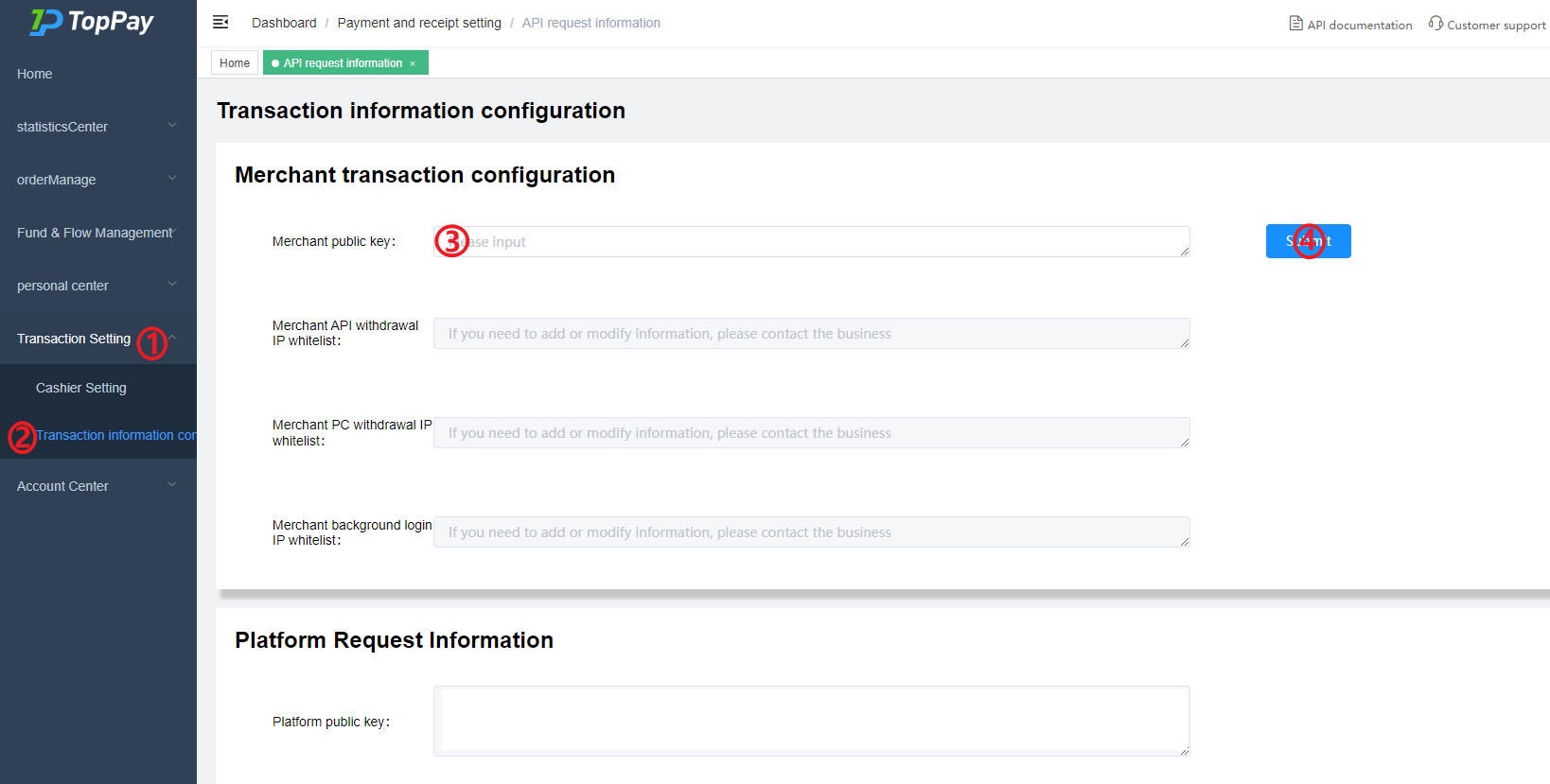
- Log in to the merchant backend. As shown in the figure above, click ① and ② in sequence to enter the Transaction Information Configuration page.
- Fill the Public Key of the generated key pair into ③.
- Click ④ to submit the filled public key content.