Fiat (Rupee) Proxy Loan Order Creation
# Code Examples
Click here to get the code example of TopPaySignUtil
import com.google.gson.Gson;
import java.util.HashMap;
import java.util.Map;

public class LoanOrderCreate {
    //MCH_ID: Merchant ID
    //Please log in to the merchant background, click Personal Center > Personal Information, and obtain the merchant ID in the basic information.
    private static final String MCH_ID = "S820211021094748000001";
    private static final String MCH_PRIVATE_KEY = "MIICeAIBADANBgkqhkiG9w0BAQEFAASCAmIwggJeAgEAAoGBAJU8gKFKD0luIYx7X8+JRdCIE0UDBctS6LjXxWLEv/EO7jDBTid6zYP1KmNgpd2DAWWtBFBSQ+gcNwVZZSBHJiSDqVvvJVs2FEbeBvfdv4X93+IYRAXksBasSW5Tpdshbo82pVL4V7wuKCuFLk9UxBHbpQjWAbfyF66RmwIbZD71AgMBAAECgYBjPe7UU2nDDSfmQg0++CyjNjqKRC5QPfxhH6w1uF1kMueXKJWOj42n2RutJpJmsj31nY8m0u4xpsG4HvCu/GGSFhhKZCHLvzp41oY2ubYj9nuFNU//81LycQjulWo2y0UUBY0k2piEt+SwPaiUNbT6nMxNMjlnjRe2okp/3rw+KQJBANG3YlZWoVbCEqzy64bJJLxiPsCA5ErGB0NzRGitq44xkhqGtR8ZZQyVz40pruNa58d73O2xyJSy5+fmZGn4E+sCQQC2LBnguj0CSCKub0mPDcunTTz9V79VXBBZdlB1/YGmRUx2s4sQrJNZS7rL4EqBQ3maIRnG+s+AXCSTfsYrV6CfAkEAxugnVfpelhoGepEAgNuggyivmgfl/2Gpm/jk5l/qOjib+ZrQiQmeBPzGWX4yiSM8eMDrP2sC8r5pJFMp5DRONwJBAJ4n4XuSFJ9jgwCPy3vvzSv9SYLk6E6yM9uHdUlKgoGYzk6Lh6M9QFuY/J49plFdBDiEnj16yCU3WeXXfTJpzB8CQQDMNMR/rIOTE9xGybS3mlQbt22AUnO6XhupWcckEKW4nPGxATwYBQzCY3i/9FTGN0vA+9ZPC2cwHtNxI2kXf3Vp";  // Merchant private key
    private static final String REQ_URL = "https://india-openapi.toppay.asia/cash/newOrder";

    public static void main(String[] args) throws Exception {
        create();
    }

    private static void create() throws Exception {
        // Assemble parameters according to the interface requirements
        Map<String, String> requestParams = new HashMap<>();
        requestParams.put("merchantCode", MCH_ID);
        requestParams.put("orderNum", "T1642593166888");
        requestParams.put("bankCode", "001");
        requestParams.put("bankAccount", "2021071209403321313122");
        requestParams.put("bankUsername", "test-name");
        requestParams.put("orderAmount", "999.56");
        requestParams.put("callback", "https://xxx/yyy");
        requestParams.put("timestamp", "1745377181");

        // Format the parameters, calculate the signature, and add the signature value to the request parameters
        String source = TopPaySignUtil.paramFormat(requestParams);
        requestParams.put("sign", TopPaySignUtil.sign(MCH_PRIVATE_KEY, source));

        // Serialize the parameters into JSON and initiate a POST request
        String postJson = new Gson().toJson(requestParams);
        System.out.println("Post Json Params:" + postJson);
        String responseJson = TopPaySignUtil.doPost(REQ_URL, postJson);
        System.out.println("Response Msg:" + responseJson);
    }
}
# Request Address
- Request Method : POST
- Request Address : https://india-openapi.toppay.asia/cash/newOrder
# Request Parameters
Note: Two new fields payType and upi have been added. If you do NOT pass payType, it defaults to 1 (bank-card payout), which is fully backward compatible — existing merchants do NOT need to make any changes.
| Parameter | Required | Description | Example |
|---|---|---|---|
| merchantCode | Y | Merchant ID, obtained from the merchant platform | S820211021094748000001 |
| orderNum | Y | Merchant order number | 10000001 |
| payType | N | Payout type. Defaults to 1 if not provided.1 = Bank-card payout2 = UPI payout | 1 |
| bankCode | Required when payType=1 | Bank code (IFSC, 4 uppercase letters + 7 digits) | SBIN0001234 |
| bankAccount | Required when payType=1 | Customer bank card number | 1234567890 |
| bankUsername | Required when payType=1 | Customer name (NOT required for UPI payout) | mike |
| upi | Required when payType=2 | Beneficiary UPI VPA address | test@ybl |
| orderAmount | Y | Order amount(Unit: 1 rupees) | 10000.00 |
| callback | Y | Callback address | https://123123.com |
| timestamp | Y | Timestamp (seconds), Get the system real-time time stamp | 1745377181 |
| sign | Y | Signature | Yg+ePvTFhiRrARcZKBcRG0l8 ... |
Signature notice: payType and upi are also included in the signature. The signing rule is unchanged: keys are sorted alphabetically and empty / missing fields are skipped automatically. Therefore, existing merchants who do not pass these two fields will produce the exact same signature string as before — no migration is required.
# Request Message Example
# 1. Bank-card payout (payType=1, default)
Recommended: pass payType=1 explicitly — clearer, more standardized, and future-proof.
{
  "merchantCode": "S820211021094748000001",
  "orderNum": "186888188666",
  "payType": "1",
  "bankCode": "SBIN0001234",
  "bankAccount": "2021071209403321313122",
  "bankUsername": "test cash name",
  "orderAmount": "10000.00",
  "callback": "your notify url",
  "timestamp": "20220101235959",
  "sign": "Yg+ePvTFhiRrARcZKBcRG0l89rqisPIuZQStYqBIwSMPaqwH77qRXI1J+jElOBpa"
}
Signing-source example (keys sorted alphabetically):
bankAccount=2021071209403321313122&bankCode=SBIN0001234&bankUsername=test cash name&callback=your notify url&merchantCode=S820211021094748000001&orderAmount=10000.00&orderNum=186888188666&payType=1×tamp=20220101235959
Backward compatibility: Existing requests that do NOT pass payType will be processed as payType=1 on the server side, and payType will be skipped in the signing string (empty values are skipped), producing exactly the same signature as before — no changes required. New integrations or merchants who want a more standardized format are recommended to pass payType=1 explicitly.
# 2. UPI payout (payType=2, new)
⚠ Activation notice: Please contact your dedicated customer service to enable the UPI payout channel before using it. Any UPI payout request will fail until the channel is activated. Once activated, you can place orders using payType=2.
For UPI mode: you MUST pass payType=2 and upi. bankCode / bankAccount / bankUsername are NOT required.
{
  "merchantCode": "S820211021094748000001",
  "orderNum": "186888188667",
  "payType": "2",
  "upi": "test@ybl",
  "orderAmount": "100.00",
  "callback": "your notify url",
  "timestamp": "1745377181",
  "sign": "Yg+ePvTFhiRrARcZKBcRG0l89rqisPIuZQStYqBIwSMPaqwH77qRXI1J+jElOBpa"
}
Signing-source example (keys sorted alphabetically, empty fields skipped):
callback=your notify url&merchantCode=S820211021094748000001&orderAmount=100.00&orderNum=186888188667&payType=2×tamp=1745377181&upi=test@ybl
# Response Parameters
- Outer Unified Return Structure
| Parameter | Type | Required | Description | Example |
|---|---|---|---|---|
| code | int | Y | Interface response code | 0 represents success, others represent failure |
| message | String | Y | Interface response message | Return specific response information |
| data | Json | Y | Interface response parameters | Refer to the internal structure of the data field below |
- Data Field Internal Structure
| Parameter | Type | Required | Description | Example |
|---|---|---|---|---|
| platOrderNum | String | Y | Platform order number | PI1453242857400963072 |
# Response Message Example
{
  "success": true,
  "code": 0,
  "message": "Success",
  "data": {
    "platOrderNum": "PAY1483771634191044608"
  }
}
# 白名单不匹配
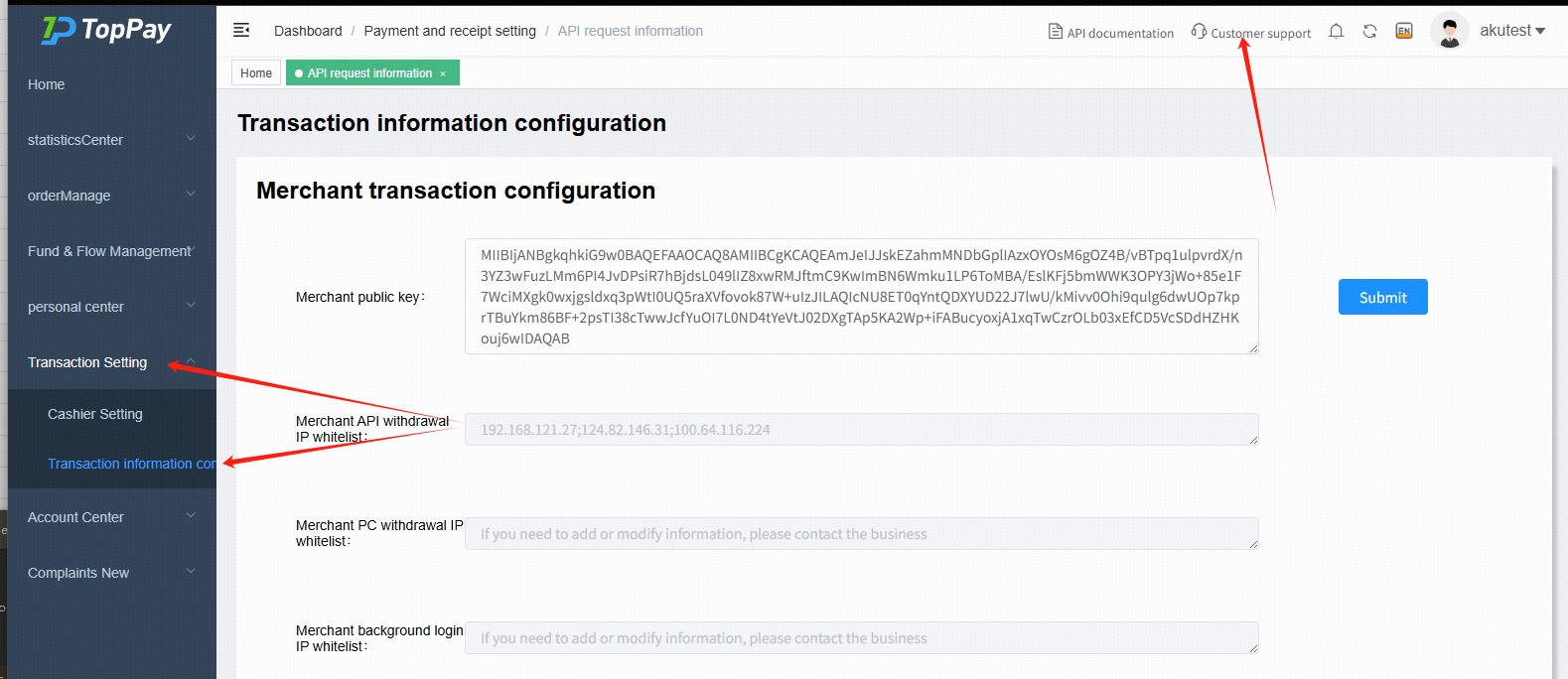
If you receive the following error: {"code":999,"message":"白名单不匹配","data":null}, please perform the following simple troubleshooting steps or contact your customer service:
Check if your network IP is listed in the menu: 【Transaction Setting -> Transaction information configuration -> Merchant API withdrawal IP whitelist】.
If your network IP is on the whitelist, please check if you are using a VPN or similar tool, and disable it before trying again.